Monday, August 31, 2015

wonderplugin Link ( Free version ) remove Solution ::


Search Criteria :
how-to-remove-wonderplugin-com-link-from-wonderplugin-slider

Solution Link :
http://stackoverflow.com/questions/26436352/how-to-remove-wonderplugin-com-link-from-wonderplugin-slider
http://stackoverflow.com/questions/31785905/how-to-remove-wonderplugin-com-link-from-free-wonder-plugin-slider?rq=1
http://stackoverflow.com/questions/26436352/how-to-remove-wonderplugin-com-link-from-wonderplugin-slider

Sunday, August 23, 2015

onmouseover AND onmouseout

<!DOCTYPE html PUBLIC "-//W3C//DTD XHTML 1.0 Transitional//EN" "http://www.w3.org/TR/xhtml1/DTD/xhtml1-transitional.dtd">
<html xmlns="http://www.w3.org/1999/xhtml">
<head>
<meta http-equiv="Content-Type" content="text/html; charset=iso-8859-1" />
<title>Untitled Document</title>

<STYLE>
<!--
  tr { background-color: #DDDDDD}
  .initial { background-color: #DDDDDD; color:#000000 }
  .normal { background-color: #CCCCCC }
  .highlight { background-color: #8888FF }
//-->
</style>


</head>

<body>


<table border="0" cellspacing="0" bgcolor="#CCCCCC" cellpadding="0">
<tr>
  <td bgcolor="#FFCC00" WIDTH="100"><b>Brand</b></td>
  <td bgcolor="#FFCC00" WIDTH="100"><b>Dimensions</b></td>
  <td bgcolor="#FFCC00" WIDTH="100"><b>Price</b></td>
  <td bgcolor="#FFCC00" WIDTH="100"><b>Size</b></td>
  <td bgcolor="#FFCC00" WIDTH="100"><b>Color</b></td>
  <td bgcolor="#FFCC00" WIDTH="100"><b>&nbsp;Type</b></td>
  <td bgcolor="#FFCC00" WIDTH="100"><b>Comment</b></td>
</tr>
<tr style="background-color:#CCCCCC;"
  onMouseOver="this.className='highlight'" onMouseOut="this.className='normal'">
  <td>Row A</td>
  <td>200x300</td>
  <td>$200,000.00</td>
  <td>small</td>
  <td>white&nbsp;</td>
  <td>good</td>
<td>2 doors</td>
</tr>
<tr
  onMouseOver="this.className='highlight'" onMouseOut="this.className='normal'">
  <td>Row B</td>
  <td>256x1000</td>
  <td>$232,300.00</td>
  <td>large</td>
  <td>yellow&nbsp;</td>
  <td>good</td>
  <td>nice</td>
</tr>
<tr class="initial"
  onMouseOver="this.className='highlight'" onMouseOut="this.className='normal'">
  <td>Row 3</td>
  <td>543x300</td>
  <td>$122,111.00</td>
  <td>medium</td>
  <td>yellow&nbsp;</td>
  <td>good</td>
  <td>expensive</td>
</tr>
</table>
</body>
</html>

Saturday, August 8, 2015

পুডিং


লাইফস্টাইল ডেস্ক
বাংলানিউজটোয়েন্টিফোর.কম
Decrease font Enlarge font
তৈরি করুন মজাদার নানা স্বাদের পুডিং। পুষ্টিকর এবং সুস্বাদু এই পুডিংগুলো খুব সহজেই তৈরি করা যায়। ট্রাই করেই দেখুন:

যা লাগবে,
দুধ আধা লিটার, ডিম চারটি, চিনি ১০০ গ্রাম, কর্ণফ্লাওয়ার এক টেবিল চামচ, লবণ সামান্য, এলাচ দুটি, দারচিনি এক টুকরো।

প্রণালী: প্রথমে দুধ জ্বালিয়ে ঘন করে নিন। ডিম দিয়ে ভালো করে বিট করুন এবার চিনি ও কর্ণফ্লাওয়ারসহ সব উপকরণ দিয়ে খুব ভালো করে ফেটে নিন। মিশ্রণ থেকে এবার এলাচ এবং দারচিনি তুলে ফেলুন।

তৈরি: একটি ঢাকনাসহ স্টিলের বক্সে প্রথমে একটু চিনি দিয়ে চুলায় দিন। যতক্ষণ চিনি বাদামী রং না হয় সে পর্যন্ত পাত্রটি ঘুরিয়ে ঘুরিয়ে সব জায়গায় ক্যারামেল লাগান। এবার ক্যারামেল শক্ত হয়ে গেলে পুডিং এর মিশ্রণ ঢেলে মুখ বন্ধ করে প্রেসার কুকারে পরিমাণমতো পানি দিয়ে ১০ টি সিটি দিন। বক্সটি বের করে দেখুন পুডিংটি ঠিকমতো হয়েছে কিনা। নরম মনে হলে আরও দুটি সিটি দিন।

তৈরি হয়ে গেল মজাদার ক্যারামেল পুডিং। ঠাণ্ডা করে পরিবেশন করুন।

দই পুডিং
উপকরণ: ডিম ২টি, গুঁড়া দুধ ১ কাপ, দই ১ কাপ, চিনি ২টেবিল চামচ, পানি ১/৪ কাপ।

প্রস্তুত প্রণালী: প্রথমে পুডিং পাত্রে ঘি ব্রাশ করে নিন। এরপর সবগুলো উপকরণ একসঙ্গে ব্রেন্ড করে নিয়ে পাত্রে ঢেলে প্রেসার কুকারে এ সিটি ওঠা পর্যন্ত অপেক্ষা করুন। এবার প্রেসার কুকারের ঢাকনা খুলে ১০ মিনিট মৃদু আচে চুলায় রাখুন।

ঠাণ্ডা হলে একটি পাত্রে পুডিং রেখে ওপরে পছন্দমতো ফল দিয়ে সাজিয়ে পরিবেশন করুন।

ক্রিম পুডিং
উপকরণ: ঘন দুধ ৩ কাপ, চিনি ১ কাপ, ডিম ৫টি, এলাচ গুঁড়া সামান্য, ক্রিম ২ টেবিল চামচ।

প্রণালী: ১ লিটার দুধ জ্বাল দিয়ে ঘন করে অর্ধেক করুন। ডিমের সঙ্গে চিনি মিশিয়ে দুধ, ডিম, চিনি, এলাচ গুঁড়া ও ক্রিম দিয়ে ভালো করে ব্লেন্ড করে নিন। চিনি দিয়ে ক্যারামেল করা পাত্রে মিশ্রণ ঢেলে পাত্রের মুখ ঢাকনা দিয়ে ঢেকে প্রেসার কুকারে পানি দিয়ে ৮ সিটি ওঠা পর্যন্ত অপেক্ষা করুন। পুডিং নিজে থেকে ঠাণ্ডা হলে পরিবেশন করুন।

চকলেট পুডিং
উপকরণঃ ডিম ৪টি, চকলেট সিরাপ ১ টেবিল চামচ, কনডেন্স মিল্ক ২ টেবিল চামচ, আধা কাপ, , পানি ১ কাপ, চকলেট পছন্দ মতো, কোকো পাউডার সামান্য।

যেভাবে তেরি করবেনঃ ডিম ফেটে নিন। চিনি দিন, গুড়া দুধ ও পানি দিন। কোকো পাউডার, চকলেট দিন। পাত্রে মিশ্রণ ঢেলে প্রেসার কুকারে পানি দিয়ে ৮ সিটি দিন। এবার পুডিং পাত্রটি তুলে ঢাকনা খুলে ফ্রিজে রেখে ঠাণ্ডা করে পরিবেশন করুন।

ফেনীর বন্ধু রাসেল পুডিং এর রেসিপির অনুরোধ করেছিলেন। আপনারাও জানাতে পারেন কি কি রেসিপি দেখতে চান। আপনার তৈরি রেসিপিও ছবিসহ পাঠাতে পারেন... lifestyle.bn24@gmail.com এই মেইলে।

Wednesday, June 17, 2015

note for jasper


1. To install a new font in jasperreport , install that in ireport and Export to jar file
   and then replace the jar file in your jasper project. to install a font in ireport ,
   go to tools -> options -> fonts and click on install fonts. follow the steps and
   you will now install new fonts in ireport. please dont forget to check embed this font in pdf.

2. Now to export the fonts , go to tools -> options -> fonts and then from the list of availble fonts
   please select the fonts you needed and then click Export as extension . which wil export the fonts as jar file.
   now replace the jar file in jasperreport library .

3. You can also add the created jar in your project lib directory.

Wednesday, June 10, 2015

From project jasper report click a font problem solution way -

error page when project run :

Now describe this error :
At first show the sample report ( this image show as design mode ) - 

5 Arrow meaning from above image
1/ Design
2/ XML
3/ Preview
4/ Sql  query write
5/ Compile

n.b: 
report_aboutFont.jpg ::


For font error( http 500 ) solve I have to make jar using this font in jasper report By following way -

Tuesday, June 9, 2015


For database connection :
install iReport software then open it and click the Arrow icon :
step - 1 :

step - 2 :
icon click _a _newWindow_show.jpg

 step - 3 :
dbJDBC _connectionClick_a _newWindow_show.jpg (Blue color)
step - 4 :
FiLLUp_this_window_Instruction.jpg
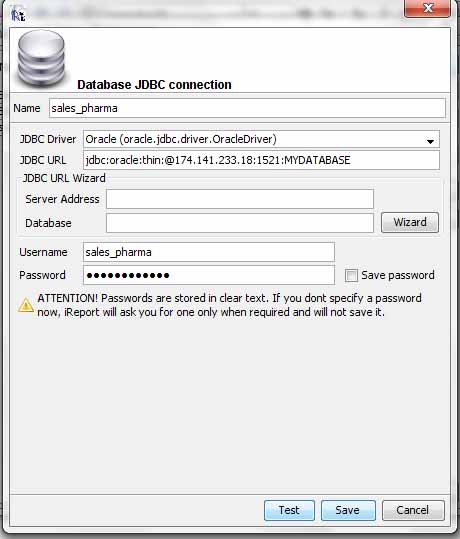
1/ Fill up name field according to project database name (sales_pharma)
2/ Fill up JDBC Driver from combo according to project database type( as orcl database )
Note : Here top line( oracle.jdbc.driver.OracleDriver ) of blue color selection part font  is black because ojdbc14.jar is ok.( describe under )
localhost will be 174.141.233.18 and also fill up user name( sales_pharma ) and password( sales_pharma ) field according to project database connection :
localhost_willBe_174.141.233.18.jpg
so, finally screen fill up and click test button for sure then save button click  :
fillUp_field.jpg

Finally screen short look like( red portion follow For fillUp form) ::
FinallY_dcreenShot.jpg

................................................................................................................................
Another portion db connection jar include way :( ojdbc14.jar is ok.( describe under ) )
dbConnectivity_jar_addSystem.jpg :
at first keep the jar ( ojdbc14.jar  ) on desktop [ according to db connection jar ]
from upper menu :: Tools -> options click Then see the red portion window.Now do click add jar button in the red portion .

................................................................................................................................
font include/add way :
at first keep the jar ( Maiandra GD.ttf  ) on desktop [ from controm panel -> font folder ]
from upper menu :: Tools -> options click Then see the red portion window.Now do click Install Font button in the red portion .

fontAdd_process_step1.jpg
step - 1 :

step -2 :
Now browse button click for select font on the desktop and Click Next button Then see the following window -
fontAdd_process_step2.jpg
Now Next next next -> finish button click Then see the below screen -
Now Keep this jar in project library folder .