Tuesday, June 9, 2015


For database connection :
install iReport software then open it and click the Arrow icon :
step - 1 :

step - 2 :
icon click _a _newWindow_show.jpg

 step - 3 :
dbJDBC _connectionClick_a _newWindow_show.jpg (Blue color)
step - 4 :
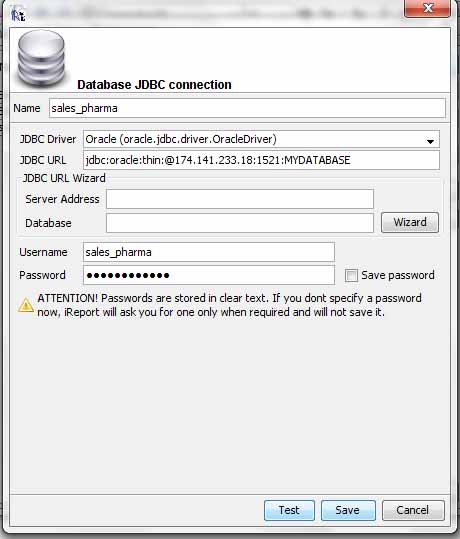
FiLLUp_this_window_Instruction.jpg
1/ Fill up name field according to project database name (sales_pharma)
2/ Fill up JDBC Driver from combo according to project database type( as orcl database )
Note : Here top line( oracle.jdbc.driver.OracleDriver ) of blue color selection part font  is black because ojdbc14.jar is ok.( describe under )
localhost will be 174.141.233.18 and also fill up user name( sales_pharma ) and password( sales_pharma ) field according to project database connection :
localhost_willBe_174.141.233.18.jpg
so, finally screen fill up and click test button for sure then save button click  :
fillUp_field.jpg

Finally screen short look like( red portion follow For fillUp form) ::
FinallY_dcreenShot.jpg

................................................................................................................................
Another portion db connection jar include way :( ojdbc14.jar is ok.( describe under ) )
dbConnectivity_jar_addSystem.jpg :
at first keep the jar ( ojdbc14.jar  ) on desktop [ according to db connection jar ]
from upper menu :: Tools -> options click Then see the red portion window.Now do click add jar button in the red portion .

................................................................................................................................
font include/add way :
at first keep the jar ( Maiandra GD.ttf  ) on desktop [ from controm panel -> font folder ]
from upper menu :: Tools -> options click Then see the red portion window.Now do click Install Font button in the red portion .

fontAdd_process_step1.jpg
step - 1 :

step -2 :
Now browse button click for select font on the desktop and Click Next button Then see the following window -
fontAdd_process_step2.jpg
Now Next next next -> finish button click Then see the below screen -
Now Keep this jar in project library folder .


jasper instruction(3.7.6) from drug project


kakka  kak akkka

Before jasper report call only insert value and return page show :
    public void saveCustomerDataInfo(){
       
        System.out.println("select call data:");
        UserBlockDao userBlockDao = new UserBlockDao();
        String stopDate = "";
        String fromDate = "";
        if(status=="S"){
            stopDate = statusWiseDate;
        } else {
            fromDate = statusWiseDate;
        }
      userBlockDao.userBlogSubmit(areaExecId,regById,name,userId,userPass,areaId,stopDate,fromDate,status,previousId,previousName,instructionBy,instructionName,designation,dateWithTime,remarks);
       
             return "saveCustomerDataInfo";
       
    }
   
After jasper report call only insert value and Not return page show :
    public void saveCustomerDataInfo(){
       
        System.out.println("select call data:");
        UserBlockDao userBlockDao = new UserBlockDao();
        String stopDate = "";
        String fromDate = "";
        if(status=="S"){
            stopDate = statusWiseDate;
        } else {
            fromDate = statusWiseDate;
        }
        int processId = userBlockDao.userBlogSubmit(areaExecId,regById,name,userId,userPass,areaId,stopDate,fromDate,status,previousId,previousName,instructionBy,instructionName,designation,dateWithTime,remarks);
       
        try {
                genInvoicePDF("processId", String.valueOf(processId),"userStatus",status);
            } catch (JRException e) {
                e.printStackTrace();
            } catch (ServletException e) {
                e.printStackTrace();
            } catch (IOException e) {
                e.printStackTrace();
            }

       
        //return "saveCustomerDataInfo";
       
    }

///////////////////////////////////
query ( int use  instead of void and return[return processId;] use instead of not return) :
 public int insertCustomerInforma(String areaExecId,String regById,String name,String userId,String userPass,String areaId,String stopDate,String fromDate,String status,String previousId,String previousName,String instructionBy,String instructionName,String designation,String dateWithTime,String remarks){
      
        System.out.println("kaniz");
        boolean fg = true;
        con = dbc.connectDB();

         if (con == null) {
             fg = false;
         }
    
    if (fg) {
     try {

         int processId = 0;

      
            st = con.createStatement();
            String unikProcessId = "select Nvl(max(process_id),0)+1 processId from ms_system_user_process";
            rs = st.executeQuery(unikProcessId);
            while(rs.next()) {
                 processId = rs.getInt("processId");
            }
          
             st = con.createStatement();
             query = "Insert into MS_SYSTEM_USER_PROCESS(PROCESS_ID, AREA_EXEC_ID, REQ_BY_ID, EXECUTIVE_NAME, USER_ID,USER_PASS, AREA_ID, START_FROM_DT, STOP_FROM_DT,"
                           + "USER_NEW_REPLACEMENT_STATUS,PRE_REQ_BY_ID, PRE_EXECUTIVE_NAME, INSTRUCTION_BY, "
                           + "INSTRUCTION_BY_NAME, DESIGNATION,INSTRUCTION_DATE_TIME, "
                           + "REMARKS)Values("+processId+", '"+areaExecId+"', '"+regById+"', '"+name+"', '"+userId+"', '"+userPass+"', '"+areaId+"', TO_DATE('"+fromDate+"', 'MM/DD/YYYY HH24:MI:SS'), TO_DATE('"+stopDate+"', 'MM/DD/YYYY HH24:MI:SS'), '"+status+"', '"+previousId+"', '"+previousName+"', '"+instructionBy+"', '"+instructionName+"', '"+designation+"', TO_DATE('"+dateWithTime+"', 'MM/DD/YYYY HH24:MI:SS'), '"+remarks+"')";
                    System.out.println("Query" + query);
                    st.executeUpdate(query);
          
    } catch (SQLException sq) {       
      sq.printStackTrace();
    } finally {
      try {
          if (rs != null) {
              rs.close();
          }
    
          con.close();
      } catch (SQLException ex) {
          ex.printStackTrace();
      }
    }
    }
  

   return processId;
  
           // return "getBankInfoPageReturn";  //  page return not query return.Remember insert query notreturn;.Only select query return List.
   }

/////////////////////////////////////////////////////////////////////
    
public void genInvoicePDF(String key, String processId,String key2, String status) throws JRException, ServletException, IOException {
            Map<String, String> parameters = new HashMap<String, String>();
            parameters.put(key, processId);
            parameters.put(key2, status);
            AllReports allReports = new AllReports();
            allReports.showReport(processId,parameters,"stopUser.jasper", "pdf");
    }


AllReports.java:

package com.drug.billing.userblock.action.utility;

import java.io.ByteArrayOutputStream;
import java.io.File;
import java.io.FileOutputStream;
import java.io.IOException;
import java.io.OutputStream;
import java.sql.Connection;
import java.util.HashMap;
import java.util.Map;

import javax.servlet.ServletContext;
import javax.servlet.ServletException;
import javax.servlet.http.HttpServletResponse;

import net.sf.jasperreports.engine.JRException;
import net.sf.jasperreports.engine.JRExporter;
import net.sf.jasperreports.engine.JRExporterParameter;
import net.sf.jasperreports.engine.JasperExportManager;
import net.sf.jasperreports.engine.JasperFillManager;
import net.sf.jasperreports.engine.JasperPrint;
import net.sf.jasperreports.engine.JasperPrintManager;
import net.sf.jasperreports.engine.export.JRCsvExporter;
import net.sf.jasperreports.engine.export.JRHtmlExporter;
import net.sf.jasperreports.engine.export.JRPdfExporter;
import net.sf.jasperreports.engine.export.JRRtfExporter;
import net.sf.jasperreports.engine.export.JRXlsExporter;
import net.sf.jasperreports.engine.export.ooxml.JRDocxExporter;

import org.apache.log4j.Logger;
import org.apache.struts2.ServletActionContext;

import com.drug.billing.userblock.database.DatabaseConnection;


public class AllReports {
    private DatabaseConnection dbc = new DatabaseConnection();
   
    public  void printReport(String accID, String filename){
             Connection con= dbc.connectDB();
            Map<String, String> parameters = new HashMap<String, String>();
            parameters.put("regNo", accID);
            try {
                ServletContext context = ServletActionContext.getServletContext();
                String path = context.getRealPath("/");
                String printFileName = JasperFillManager.fillReportToFile(path + "/Jasper"+ "/" + filename,parameters,con);
                JasperPrintManager.printReport(printFileName, false);
            } catch (JRException e) {
                e.printStackTrace();
            }
    }
   
   
    public  void showReport(String key,Map<String, String> parameters, String filename, String reportType)
            throws JRException, ServletException, IOException {

        Connection connection = null;
        HttpServletResponse response = ServletActionContext.getResponse();
        String outputFileName = "report_" + parameters.get(key);


/*        parameters.put("regNo", accID);*/
        connection = dbc.connectDB();

        ServletContext context = ServletActionContext.getServletContext();
        String path = context.getRealPath("/");// .getContextPath();

        JasperPrint jasperPrint = JasperFillManager.fillReport(path + "/Jasper"+ "/" + filename, parameters, connection);
        System.out.println("Report Created");

        OutputStream ouputStream = response.getOutputStream();

        JRExporter exporter = null;

        if ("pdf".equalsIgnoreCase(reportType)) {

            response.setContentType("application/pdf");
            // If you want show the report in the browser then write
            // “inline�
            response.setHeader("Content-disposition", "inline;filename="
                    + outputFileName + "." + reportType);
            // If you want show the report out of the browser as a .pdf format
            // then write “attachment�
            // response.setHeader(“Content-disposition�,
            // “attachment;filename=�+outputFileName+�.�+reportType);
            exporter = new JRPdfExporter();
            exporter.setParameter(JRExporterParameter.JASPER_PRINT, jasperPrint);
            exporter.setParameter(JRExporterParameter.OUTPUT_STREAM,
                    ouputStream);

        } else if ("rtf".equalsIgnoreCase(reportType)) {

            response.setContentType("application/rtf");
            response.setHeader("Content-disposition", "inline;filename="
                    + outputFileName + "." + reportType);
            exporter = new JRRtfExporter();
            exporter.setParameter(JRExporterParameter.JASPER_PRINT, jasperPrint);
            exporter.setParameter(JRExporterParameter.OUTPUT_STREAM,
                    ouputStream);

        } else if ("html".equalsIgnoreCase(reportType)) {

            exporter = new JRHtmlExporter();
            exporter.setParameter(JRExporterParameter.JASPER_PRINT, jasperPrint);
            exporter.setParameter(JRExporterParameter.OUTPUT_STREAM,
                    ouputStream);

        } else if ("xls".equalsIgnoreCase(reportType)) {

            response.setContentType("application/xls");
            response.setHeader("Content-disposition", "inline;filename="
                    + outputFileName + "." + reportType);
            exporter = new JRXlsExporter();
            exporter.setParameter(JRExporterParameter.JASPER_PRINT, jasperPrint);
            exporter.setParameter(JRExporterParameter.OUTPUT_STREAM,
                    ouputStream);

        } else if ("csv".equalsIgnoreCase(reportType)) {

            response.setContentType("application/xls");
            response.setHeader("Content-disposition", "inline;filename="
                    + outputFileName + "." + reportType);
            exporter = new JRCsvExporter();
            exporter.setParameter(JRExporterParameter.JASPER_PRINT, jasperPrint);
            exporter.setParameter(JRExporterParameter.OUTPUT_STREAM,
                    ouputStream);
        }

        try {
            exporter.exportReport();

        } catch (JRException e) {
            throw new ServletException(e);
        } finally {
            if (ouputStream != null) {
                try {
                    ouputStream.close();
                } catch (IOException ex) {
                }
            }
        }
    }
   
   
    public  void showPDFReport( String filename, String reportType)
            throws JRException, ServletException, IOException {
        Connection connection = null;
        HttpServletResponse response = ServletActionContext.getResponse();
        String outputFileName = "PolioceReport";

        Map<String, String> parameters = new HashMap<String, String>();

        connection = dbc.connectDB();

        ServletContext context = ServletActionContext.getServletContext();
        String path = context.getRealPath("/");// .getContextPath();
        System.out.println(path);
        JasperPrint jasperPrint = JasperFillManager.fillReport(path + "/Jasper"+ "/" + filename, parameters, connection);
       
        OutputStream ouputStream = response.getOutputStream();
        OutputStream out2 = null;
        out2 = new FileOutputStream(new File(path += "Jasper\\"+filename+".docx"));
        ByteArrayOutputStream byteArrayOutputStream2 = new ByteArrayOutputStream();
        try {
            JRExporter exporter = null;
   
            response.setContentType("application/docx");
            response.setHeader("Content-disposition", "inline;filename="
                    + outputFileName + "." + reportType);
            exporter = new JRDocxExporter();
            exporter.setParameter(JRExporterParameter.JASPER_PRINT, jasperPrint);
            exporter.setParameter(JRExporterParameter.OUTPUT_STREAM,byteArrayOutputStream2);
            exporter.exportReport();
             out2.write(byteArrayOutputStream2.toByteArray());
                out2.flush();
                out2.close();

        } catch(JRException e){
            throw new ServletException(e);
        } finally {
            if (ouputStream != null) {
                try {
                    ouputStream.close();
                } catch (IOException ex) {
                }
            }
        }
    }
   
   
    public  void showPDFReport(String accID, String filename, String reportType)
            throws JRException, ServletException, IOException {
        Connection connection = null;
        HttpServletResponse response = ServletActionContext.getResponse();
        String outputFileName = "PolioceReport";

        Map<String, String> parameters = new HashMap<String, String>();

        parameters.put("regNo", accID);
        connection = dbc.connectDB();

        ServletContext context = ServletActionContext.getServletContext();
        String path = context.getRealPath("/");// .getContextPath();
        System.out.println(path);
        JasperPrint jasperPrint = JasperFillManager.fillReport(path + "/Jasper"+ "/" + filename, parameters, connection);
       
        OutputStream ouputStream = response.getOutputStream();
        OutputStream out2 = null;
        out2 = new FileOutputStream(new File("C:\\Jasper\\"+accID+".docx"));
        ByteArrayOutputStream byteArrayOutputStream2 = new ByteArrayOutputStream();
        try {
            JRExporter exporter = null;
   
            response.setContentType("application/docx");
            response.setHeader("Content-disposition", "inline;filename="
                    + outputFileName + "." + reportType);
            exporter = new JRDocxExporter();
            exporter.setParameter(JRExporterParameter.JASPER_PRINT, jasperPrint);
            exporter.setParameter(JRExporterParameter.OUTPUT_STREAM,byteArrayOutputStream2);
            exporter.exportReport();
             out2.write(byteArrayOutputStream2.toByteArray());
                out2.flush();
                out2.close();

        } catch(JRException e){
            throw new ServletException(e);
        } finally {
            if (ouputStream != null) {
                try {
                    ouputStream.close();
                } catch (IOException ex) {
                }
            }
        }
    }
   
    public static void genWordToPDF(String vbsPath, String docPath) {
       
        try {
            Process process = Runtime.getRuntime().exec("cscript "+vbsPath+" "+docPath);
            process.waitFor();
        } catch (IOException e) {
            // TODO Auto-generated catch block
            e.printStackTrace();
        } catch(InterruptedException ex) {
            ex.printStackTrace();
        }
       
    }

}


Drug or sales pharma project Log in


public String successLogin(){
        int usrname = 0;
       
          boolean fg = true;
          con = dbc.connectDB();

         
           if (con == null) {
               fg = false;
           }


           if (fg) {
               try { 
           
                   st = con.createStatement();                                       
               String query = "SELECT  USER_NAME,USER_ID,USER_PASS FROM UB_SYSTEM_USER WHERE USER_ID = '"+userId+"' AND USER_PASS = '"+userPass+"'  AND ACTIVATION_FLAG = 1 ";
                   System.out.println(query);
                  
                   ResultSet  rs = st.executeQuery(query);
                 
                 while (rs.next()) {
                      usrname = rs.getRow();                
                  }
                  
                  
               } catch (SQLException sq) {         
                    sq.printStackTrace();
                  } finally {
                    try {
                        if (rs != null) {
                            rs.close();
                        }
                    
                        con.close();
                    } catch (SQLException ex) {
                        ex.printStackTrace();
                    }
                  }
                  }


           if (usrname>0) {
             
               return "successLogin";
           }else{
            addFieldError("logMsg", "Invalid User ID or Password");
               return "notloginhomePage";   
           }
       
    }


jsp page ::
 <div style="color:#FF0000; ">
                                 <s:fielderror>
                                    <s:param value="logMsg"/>
                                 </s:fielderror>

  </div>

java action class :
public class LoadAction extends ActionSupport {
// create method
}

struts2 configure :
<package name="web"  extends="jasperreports-default, struts-default, json-default" namespace="/">
 </package>

Drug Project need validation required


submit by form ::

<form id="confirmCustomerForm" style="margin: 0px;" action="saveCustomerDataInfoLoad.do">
   
    <div id="body_content" style="float:left; width:1000px; margin-top:9px;">
       <table width="100%" border="0" cellpadding="1" cellspacing="1" >
  <tr>
    <td class="txtAllign">Request By ID  :</td>
    <td colspan="4">
    <span><input name="regById" id="regById" type="text" value="" style="width:80px;" placeholder="id" onblur="showUserValue(this.id)" required /></span>    </td>
    <td>&nbsp;</td>
  </tr>
  <tr>
    <td class="txtAllign">&nbsp;</td>
    <td>&nbsp;</td>
    <td>&nbsp;</td>
    <td class="txtAllign">&nbsp;</td>
    <td><input name="areaExecId" id="areaExecId" type="hidden" value="" style=""/></td>
    <td>&nbsp;</td>
  </tr>
  <tr>
    <td width="13%" class="txtAllign">Name : </td>
    <td width="23%"><input name="name" id="name" type="text" value="" style="width:200px;" /></td>
    <td width="5%">&nbsp;</td>
    <td width="11%" class="txtAllign">Area name :</td>
    <td width="24%"><input name="areaId" id="areaId" type="hidden" value="" style=""/>
    <input name="areaName" id="areaName" type="text" value="" style="width:200px;"/></td>
    <td width="24%">&nbsp;</td>
  </tr>
  <tr>
    <td class="txtAllign">User id : </td>
    <td><input name="userId" id="userId" type="text" value="" style="width:200px;"/></td>
    <td>&nbsp;</td>
    <td>&nbsp;</td>
    <td>&nbsp;</td>
    <td>&nbsp;</td>
  </tr>
  <tr>
    <td class="txtAllign">User pass : </td>
    <td><input name="userPass" id="userPass" type="text" value="" style="width:200px;"/></td>
    <td>&nbsp;</td>
    <td>&nbsp;</td>
    <td>&nbsp;</td>
    <td>&nbsp;</td>
  </tr>
  <tr>
    <td class="txtAllign">Status : </td>
    <td>
    <select name="status" id="status" onChange="getStatusDetails(this);">
      <option value="S">Stop user</option>
      <option value="N">New user</option>
      <option value="R">Replace user</option>
    </select>    </td>
    <td>&nbsp;</td>
    <td>&nbsp;</td>
    <td>&nbsp;</td>
    <td>&nbsp;</td>
  </tr>
  <tr>
    <td class="txtAllign" id="details_select">Stop Date</td>
    <td> <input name="statusWiseDate" id="statusWiseDate" type="text" placeholder="mm/dd/yyyy" required /></td>
    <td> </td>
    <td class="txtAllign">Previous name :</td>
     <td><span><input name="previousId" id="previousId" type="text" value="" style="width:50px;" placeholder="id" disabled="true"/>&nbsp;</span>
   <span><input name="previousName" id="previousName" type="text" value="" style="width:100px;" placeholder="previous name" disabled="true"/></span></td>
    <td>&nbsp;</td>
  </tr>
  <tr>
    <td class="txtAllign">Instruction by : </td>
   <td><span><input name="instructionBy" id="instructionBy" type="text" value="" style="width:50px;" placeholder="id" onblur="showInstructionBy(this.id);" required />&nbsp;</span>
   <span><input name="instructionName" id="instructionName" type="text" value="" style="width:100px;" placeholder="name"/></span></td>
    <td>&nbsp;</td>
    <td>&nbsp;</td>
    <td>&nbsp;</td>
    <td>&nbsp;</td>
  </tr>
  <tr>
    <td class="txtAllign">Designation : </td>
    <td><input name="designation" id="designation" type="text" value="" style="width:200px;"/></td>
    <td></td>
    <td class="txtAllign">Instruction Date : </td>
    <td><input name="dateWithTime" id="dateWithTime" type="text" placeholder="mm/dd/yyyy" required/></td>
    <td>&nbsp;</td>
  </tr>
  <tr>
    <td class="txtAllign">Remarks : </td>
    <td colspan="4"><textarea name="remarks" id="remarks"></textarea></td>
    <td>&nbsp;</td>
  </tr>
  <tr>
    <td>&nbsp;</td>
    <td>&nbsp;</td>
    <td>&nbsp;</td>
    <td>&nbsp;</td>
    <td>&nbsp;</td>
    <td>&nbsp;</td>
  </tr>
</table>
    <table style="text-align:center; padding-left: 70px;">
    <tr >
         <td><input name="" type="submit" value="save" /></td>
         <td><input name="" type="reset" value="clear"/></td>
         <td><input name="" type="button" value="Exit" onclick="showExit();"/></td>
         <td>
            <a href="#mydiv" rel="facebox"><img src="Script//reportView.png"/></a>
         </td>
      </tr>
    </table>
    </div>
    </form>

Monday, June 8, 2015

json value return and show in success function


struts configure:
<struts>

 <package name="web"  extends="jasperreports-default, struts-default, json-default" namespace="/">
      <action name="*Gsn" class="com.drug.billing.userblock.action.GsnAction" method="{1}">
            <result type="json"></result>
      </action>
    </package>

</struts>

GsnAction.java ::
    private ExecutiveInfo userBlockInfo =new ExecutiveInfo();
    public String userValue(){//use json
       
        System.out.println("select ist blur user data :");
        UserBlockDao userBlockDao = new UserBlockDao();
        userBlockInfo = userBlockDao.getUserBlockInfoByRegById(regById);
       
        return Action.SUCCESS;   
       
    }

need jar : gson-2.2.4.jar


<script type="text/javascript">
     function showUserValue(id){
        // alert("kaniz ");
         var regById = document.getElementById(id).value;
        // alert(regById);
       
        var ajaxURL = "userValueGsn.do?regById="+regById;
       
        $.ajax({
            async:false,
            url : ajaxURL,
            dataType:'json',
            success : function(result) {
                if(result.userBlockInfo!=null) {
                //alert("kf"+result.userBlockInfo.userId);
                 $("#name").val(result.userBlockInfo.userId);
               
                 $("#userId").val(result.userBlockInfo.userId);
                 $("#userPass").val(result.userBlockInfo.userPass);
                 $("#areaName").val(result.userBlockInfo.areaName);
               
                  $("#areaExecId").val(result.userBlockInfo.areaExecId);
                  $("#areaId").val(result.userBlockInfo.areaId);
                }
            },
           
        });
    }
</script>

Jasper font show as jar that put in Library folder


error type below without jasper font jar :


search ::  ( how to install new fonts in jasperreports )
 http://www.qualogy.sr/adding-fonts-to-jasper-reports-integration/
http://stackoverflow.com/questions/14831465/how-to-install-new-fonts-in-jasperreports


Adding fonts to Jasper Reports Integration

Read more at: